Build a JAVA application which acts as a DNF and CNF Generator. Your application will open a (J)Frame GUI with widgets textfield for filename to be entered, two buttons/radiobuttons, and a textarea. The file read will contain a table for a switching function. The buttons/radiobuttons should perform the DNF or CNF generation. To make testing simple, you might echo the file’s contents into the textarea first.
Given a table – the file’s contents in your application - for a switching function (last column represents the function value):
0001
0011
0100
0110
1001
1010
1100
1110
The DNF (or SOP) is a canonical form consisting of the or-ing together of conjunctions. Each 1 in the function column represents a term in the DNF expression. There are 3 ones in the last column and three terms in the DNF. The above example would have DNF
a'*b'*c'+a'*b'*c+a*b'*c'
Your application program should read in a file (see class notes and or code below) containing 0s and 1s. The last column represents the function. Input may consist of up to 27 columns (variable names from a to z).
Example (legal file)
000
011
101
110
This happens to be the XOR function whose DNF is
a'*b+a*b'
These terms are generated based on the middle two rows of the table.
You should also be able to generate the other canonical representation for your table: POS (product of sums) corresponding to the conjunctive normal form. Here columns ending in 0 generate a term. In each sum term, consider a variable complemented if it appears as a 1 and uncomplemented if it appears as a 0. Put parentheses around terms and and (*) them together.
DeMorgan's Law gives some insight into the relationship between SOP and POS, using the zeros in the table and negating the sum of products :
(a'*b'+a*b)' = (a'*b')'+(a*b)'
= (a+b)*(a'+b')
which is POS
Two buttons on the interface allow the user to select which form she wishes to view. The textfield allows the user to specify the file. Show the original file contents and the selected representation in the textarea. If no file is specified before a button is pressed a warning message is displayed. If an I/O error occurs, display this message on the screen when the filename is entered.
Note: applets are not allowed to read/write
files on your system, so this project uses an application.
Some useful code:
1. A
minimal java application to read a file whose name is entered on the command
line:
import java.io.*;
public class BufferedRead{
public static void main(String []args){//String args[] contains command line information
if(args.length<1){ //there must be a file given
on command line
System.err.println("usage
requires >> C: copy fname.txt");
System.exit(0);}
//wrap data input object around file input object to use readline
try{
BufferedReader istream=new BufferedReader(new FileReader(args[0]));
String line;
while((line=istream.readLine())
!=null)
System.out.println(line);
istream.close();}
catch(IOException e){ System.err.println(e);}
}}
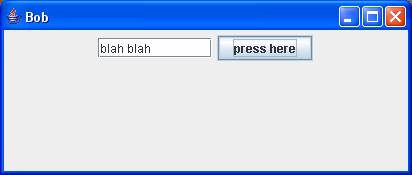
2. Here is an application program that opens the JFrame (screenshot
above):
import javax.swing.*;
import java.awt.*;
//notice – no ActionListener so button doesn’t work
public class frameex2 extends JFrame{
public frameex2(){//constructor
super("Bob");//call super to put title on frame
JTextField t=new JTextField(10);
JButton b=new JButton("press here");
setSize(300,400);//will appear in upper left corner by default
Container c=getContentPane();
c.setLayout(new FlowLayout());
c.add(t);
c.add(b);
setVisible(true);
setDefaultCloseOperation(JFrame.EXIT_ON_CLOSE);}//end constructor
public static void main(String args[]){frameex2 f=new frameex2();}}
Some development tips for this project. You are already pretty capable, having completed project 1. As a first step, get both pieces of code above working. Next, combine these two into a single application that can open and display a file’s contents. Now you are ready to tackle the issue of functionality. Something to work on: You might try using a new layout called borderlayout. Put the textarea in the CENTER of your borderlayout, put other widgets NORTH, SOUTH, EAST or WEST.