Building webservices with Axis
For below…the examples are from
axis2-1.3 Need to run the axis
server in axis21.3 .---/bin/runserver.bat
Then go to localhost:8080
Working on axis2.samples… here is pojo client run
C:\axis\samples\pojo>ant rpc.client
Buildfile: build.xml
clean:
[delete] Deleting directory C:\axis\samples\pojo\build
prepare:
[mkdir] Created dir: C:\axis\samples\pojo\build
[mkdir] Created dir: C:\axis\samples\pojo\build\classes
[mkdir] Created dir: C:\axis\samples\pojo\build\lib
[mkdir] Created dir: C:\axis\samples\pojo\build\classes\META-INF
rpc.client:
rpc.client.compile:
[javac] Compiling 2 source files to C:\axis\samples\pojo\build\classes
rpc.client.jar:
[jar] Building jar: C:\axis\samples\pojo\build\lib\rpc-client.jar
rpc.client.run:
[java] log4j:WARN No appenders could be found for logger (org.apache.axis2.
util.Loader).
[java] log4j:WARN Please initialize the log4j system properly.
[java] Name :Abby Cadabby
[java] Street :
[java] City :
[java] State :
[java] Postal Code :11111
BUILD SUCCESSFUL
Total time: 5 seconds
C:\axis\samples\pojo>
With a little monkeying I added code to the client to insert more names and search for a different value:
[java] Adding....Name :Abby Cadabby
[java] Adding....Name :Billy Joe Bob Ben
[java] Name :Billy Joe Bob Ben
[java] Street :
[java] City :
[java] State :State of
[java] Postal Code :22222
It would be easy to build a frame interface for this.
Here’s the client which creates a few entries:
package sample.addressbook.rpcclient;
import javax.xml.namespace.QName;
import org.apache.axis2.AxisFault;
import org.apache.axis2.addressing.EndpointReference;
import org.apache.axis2.client.Options;
import
org.apache.axis2.rpc.client.RPCServiceClient;
import sample.addressbook.entry.Entry;
public class AddressBookRPCClient {
public static void main(String[] args1) throws AxisFault {
RPCServiceClient serviceClient = new RPCServiceClient();
Options options = serviceClient.getOptions();
EndpointReference targetEPR = new EndpointReference(
"http://127.0.0.1:8080/axis2/services/AddressBookService");
options.setTo(targetEPR);
// /////////////////////////////////////////////////////////////////////
/*
* Creates an Entry and stores it in the AddressBook.
*/
// QName of the target method
QName opAddEntry = new QName("http://service.addressbook.sample", "addEntry");
/*
* Constructing a new Entry
*/
Entry entry1 = new Entry();
entry1.setName("Abby Cadabby");
entry1.setStreet("
entry1.setCity("
entry1.setState("
entry1.setPostalCode("11111");
Entry entry2 = new Entry();
System.out.println("Adding....Name :" + entry1.getName());
// Constructing the arguments array for the method invocation
Object[] opAddEntryArgs = new Object[] { entry1 };
// Invoking the method
serviceClient.invokeRobust(opAddEntry, opAddEntryArgs);
entry2.setName("Billy Joe Bob Ben");
entry2.setStreet("
entry2.setCity("
entry2.setState("State
of
entry2.setPostalCode("22222");
System.out.println("Adding....Name :" + entry2.getName());
opAddEntryArgs = new Object[] { entry2 };
// Invoking the method
serviceClient.invokeRobust(opAddEntry, opAddEntryArgs);
////////////////////////////////////////////////////////////////////////
///////////////////////////////////////////////////////////////////////
/*
* Fetching an Entry from the Address book
*/
// QName of the method to invoke
QName opFindEntry = new QName("http://service.addressbook.sample", "findEntry");
//
String name = "Billy Joe Bob Ben";
Object[] opFindEntryArgs = new Object[] { name};
Class[] returnTypes = new Class[] { Entry.class };
Object[] response = serviceClient.invokeBlocking(opFindEntry,
opFindEntryArgs, returnTypes);
Entry result = (Entry) response[0];
if (result == null) {
System.out.println("No entry found for " + name);
return;
}
System.out.println("Name :" + result.getName());
System.out.println("Street :" + result.getStreet());
System.out.println("City :" + result.getCity());
System.out.println("State :" + result.getState());
System.out.println("Postal Code :" + result.getPostalCode());
///////////////////////////////////////////////////////////////////////
}
}
I don’t show the Entry class which has name, etc fields plus getters and setters…
Here is the service class
package sample.addressbook.service;
import java.util.HashMap;
import sample.addressbook.entry.Entry;
public class AddressBookService {
private HashMap entries = new HashMap();
/**
* Add an Entry to the Address Book
* @param entry
*/
public void addEntry(Entry entry) {
this.entries.put(entry.getName(), entry);
}
/**
* Search an address of a person
*
* @param name the name of the person whose address needs to be found
* @return return the address entry of the person.
*/
public Entry findEntry(String name) {
return (Entry) this.entries.get(name);
}
}
The META-INF dir contains the service.xml which axis uses for creating the service:
<service name="AddressBookService" scope="application">
<description>
POJO: AddressBook Service
</description>
<messageReceivers>
<messageReceiver mep="http://www.w3.org/2004/08/wsdl/in-only"
class="org.apache.axis2.rpc.receivers.RPCInOnlyMessageReceiver"/>
<messageReceiver mep="http://www.w3.org/2004/08/wsdl/in-out"
class="org.apache.axis2.rpc.receivers.RPCMessageReceiver"/>
</messageReceivers>
<parameter name="ServiceClass">sample.addressbook.service.AddressBookService</parameter>
</service>
I built the jar file for stockquote example by changing the ant buildfile:
<jar destfile="${build.dir}/StockQuoteService.jar"><!--changed from aar-->
<fileset excludes="**/Test.class" dir="${build.dir}/classes"/>
</jar>
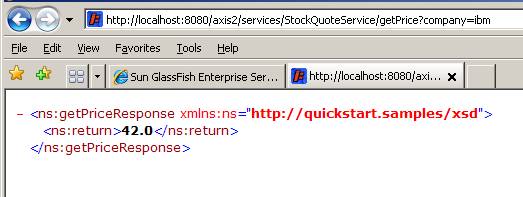
Running ant in yahoo search automatically runs client:
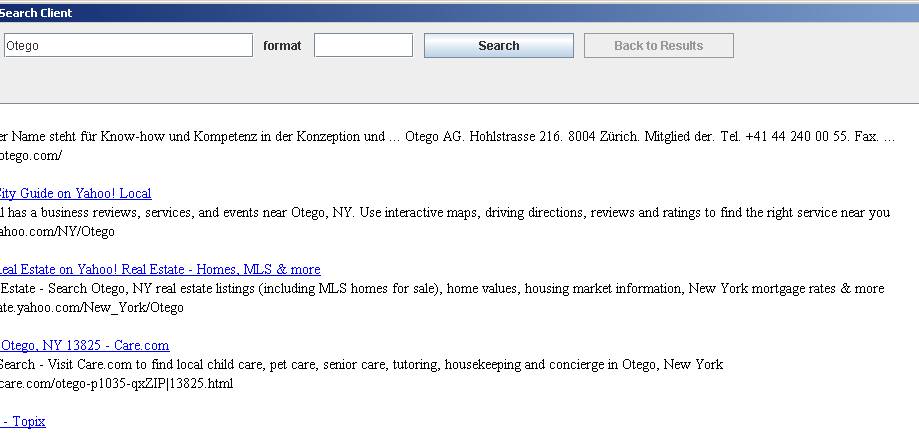
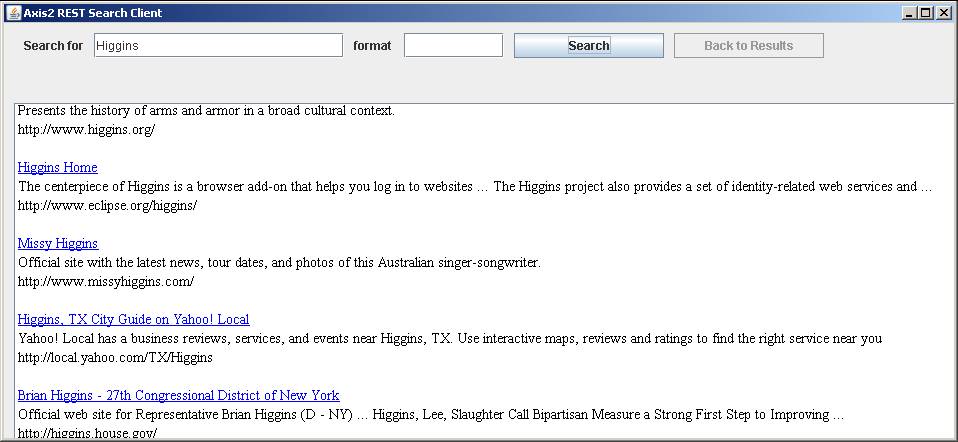
And here is Axis2 Rest Search Client…. Run ant in the root and the service and client run.
Did not get weatherspringservice to work
Soap with attachments sends a file…
C:\axis2-1.3\samples\soapwithattachments>ant generate.service
Buildfile: build.xml
compile:
[mkdir] Created dir: C:\axis2-1.3\samples\soapwithattachments\build\classes
[javac] Compiling 2 source files to C:\axis2-1.3\samples\soapwithattachments
\build\classes
generate.service:
[jar] Building jar: C:\axis2-1.3\samples\soapwithattachments\build\sample-
swa.aar
[copy] Copying 1 file to C:\axis2-1.3\repository\services
BUILD SUCCESSFUL
Total time: 2 seconds
C:\axis2-1.3\samples\soapwithattachments>ant run.client -Dfile tmp.txt -Ddest C:
\tmp.txt
Buildfile: build.xml
compile:
check-parameters:
print-usage:
run.client:
[jar] Building jar: C:\axis2-1.3\samples\soapwithattachments\build\swaSamp
leClient.jar
[java] log4j:WARN No appenders could be found for logger (org.apache.axis2.
deployment.FileSystemConfigurator).
[java] log4j:WARN Please initialize the log4j system properly.
[java] File saved succesfully.
BUILD SUCCESSFUL
Total time: 2 seconds
C:\axis2-1.3\samples\soapwithattachments>
Weather service in pojoguide…
This is similar to pojo above… it does not provide a connection to any service but just allows get/set Weather object
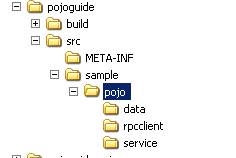
This and the addressbook provide models for converting pojos into webservices.
Here’s weather service output
[java] Temperature : 39.3
[java] Forecast : Cloudy with showers
[java] Rain : true
[java] How much rain (in inches) : 4.5
Here is the weather class:
package sample.pojo.data;
public class Weather{
float temperature;
String forecast;
boolean rain;
float howMuchRain;
public void setTemperature(float temp){
temperature = temp;
}
public float getTemperature(){
return temperature;
}
public void setForecast(String fore){
forecast = fore;
}
public String getForecast(){
return forecast;
}
public void setRain(boolean r){
rain = r;
}
public boolean getRain(){
return rain;
}
public void setHowMuchRain(float howMuch){
howMuchRain = howMuch;
}
public float getHowMuchRain(){
return howMuchRain;
}
}
And the service couldn’t be simpler:
package sample.pojo.service;
import sample.pojo.data.Weather;
public class WeatherService{
Weather weather;
public void setWeather(Weather weather){
this.weather = weather;
}
public Weather getWeather(){
return this.weather;
}
}
And the client:
package sample.pojo.rpcclient;
import javax.xml.namespace.QName;
import org.apache.axis2.AxisFault;
import org.apache.axis2.addressing.EndpointReference;
import org.apache.axis2.client.Options;
import
org.apache.axis2.rpc.client.RPCServiceClient;
import sample.pojo.data.Weather;
public class WeatherRPCClient {
public static void main(String[] args1) throws AxisFault {
RPCServiceClient serviceClient = new RPCServiceClient();
Options options = serviceClient.getOptions();
EndpointReference targetEPR = new EndpointReference("http://localhost:8080/axis2/services/WeatherService");
options.setTo(targetEPR);
// Setting the weather
QName opSetWeather = new QName("http://service.pojo.sample", "setWeather");
Weather w = new Weather();
w.setTemperature((float)39.3);
w.setForecast("Cloudy with showers");
w.setRain(true);
w.setHowMuchRain((float)4.5);
Object[] opSetWeatherArgs = new Object[] { w };
serviceClient.invokeRobust(opSetWeather, opSetWeatherArgs);
// Getting the weather
QName opGetWeather = new QName("http://service.pojo.sample", "getWeather");
Object[] opGetWeatherArgs = new Object[] { };//
Class[] returnTypes = new Class[] { Weather.class };
Object[] response = serviceClient.invokeBlocking(opGetWeather,
opGetWeatherArgs, returnTypes);
Weather result = (Weather) response[0];
if (result == null) {
System.out.println("Weather didn't initialize!");
return;
}
// Displaying the result
System.out.println("Temperature : " +
result.getTemperature());
System.out.println("Forecast : " +
result.getForecast());
System.out.println("Rain : " +
result.getRain());
System.out.println("How much rain (in inches) : " +
result.getHowMuchRain());
}
}
I took the pojo example and built a statespojo
Here is the axis service running:
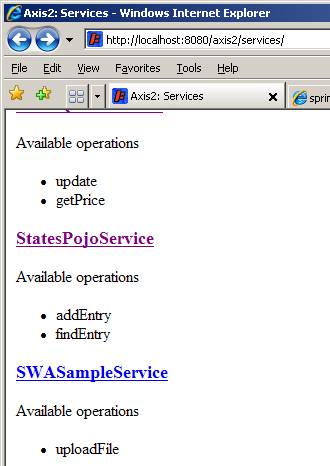
… here is the client running:
[java]
Adding....Name :
[java]
Adding....Name :
[java]
Adding....Name :
[java]
Adding....Name :
[java]
Adding....Name :
[java]
Adding....Name :
[java]
Adding....Name :
Lookup part:
[java] Name :
[java] Capitol :
BUILD SUCCESSFUL
Total time: 3 seconds
C:\axis2-1.3\samples\statespojo>
BUILD SUCCESSFUL
Total time: 4 seconds
C:\axis2-1.3\samples\statespojo>
Note… in next iteration I moved the adding states to hashmap
into the ws.
This example webservice/client app was modeled after
the pojo examples that came with axis2 distribution.
package sample.statespojo.rpcclient;
import javax.xml.namespace.QName;
import org.apache.axis2.AxisFault;
import org.apache.axis2.addressing.EndpointReference;
import
org.apache.axis2.client.Options;
import
org.apache.axis2.rpc.client.RPCServiceClient;
import sample.statespojo.entry.Entry;
public class StatesPojoRPCClient {
public static void main(String[] args1) throws AxisFault {
RPCServiceClient serviceClient = new RPCServiceClient();
Options options = serviceClient.getOptions();
EndpointReference targetEPR = new EndpointReference(
"http://127.0.0.1:8080/axis2/services/StatesPojoService");
options.setTo(targetEPR);
// /////////////////////////////////////////////////////////////////////
/*
* Creates an Entry and stores it in the states
*/
// QName of the target method
QName opAddEntry = new QName("http://service.statespojo.sample", "addEntry");
/*
* Constructing a new Entry
*/
Entry entry = new Entry();
entry.setStateName("
entry.setStateCapitol("
Object[] opAddEntryArgs ;
System.out.println("Adding....Name :" + entry.getStateName());
// Constructing the arguments array for the method invocation
opAddEntryArgs = new Object[] { entry };
// Invoking the method
serviceClient.invokeRobust(opAddEntry, opAddEntryArgs);
////////////////////////////////////////////////////////////////////////
///////////////////////////////////////////////////////////////////////
/*
* Fetching an Entry from the Address book
*/
// QName of the method to invoke
QName opFindEntry = new QName("http://service.statespojo.sample", "findEntry");
//
String name =
"
Object[] opFindEntryArgs = new Object[] { name};
Class[] returnTypes = new Class[] { Entry.class };
Object[] response = serviceClient.invokeBlocking(opFindEntry,
opFindEntryArgs, returnTypes);
Entry result = (Entry) response[0];
if (result == null) {
System.out.println("No entry found for " + name);
return;
}
System.out.println("Name :" + result.getStateName());
System.out.println("Capitol :" + result.getStateCapitol());
///////////////////////////////////////////////////////////////////////
}
}
package sample.statespojo.entry;
public class Entry {
private String statename = null;
private String statecapitol = null;
public String getStateName() {
return statename;
}
public void setStateName(String sn) {
this.statename = sn;
}
public String getStateCapitol() {
return statecapitol;
}
public void setStateCapitol(String sc) {
this.statecapitol = sc;
}
}
package sample.statespojo.service;
import java.util.HashMap;
import sample.statespojo.entry.Entry;
public class StatesPojoService {
private HashMap entries;
public StatesPojoService(){
entries= new HashMap(50);
Entry entry=new Entry();
String states[]={"New York", "New Jersey","Louisiana", "North Dakota","Kansas","Oklahoma","California","Pennsylvania"};
String caps[]={"Albany","Trenton","Baton Rouge","Pierre","Topeka","Oklahoma City","Sacremento","Harrisburg"};
for(int k=0;k<states.length;k++){
entry.setStateName(states[k]);
entry.setStateCapitol(caps[k]);
this.entries.put(states[k],entry);
}
}
/**
* Add an Entry to the statespojoBook
* @param entry
*/
public Entry addEntry(Entry entry) {
this.entries.put(entry.getStateName(), entry);return entry;
}
public Entry addEntry(String sname,String capname) {
Entry entry=new Entry();
entry.setStateName(sname);
entry.setStateCapitol(capname);
this.entries.put(entry.getStateName(), entry);
return entry;
}
public Entry findEntry(String name) {
return (Entry) this.entries.get(name);
}
}
Ant build script in root
<project name="statespojo" basedir="." default="generate.service">
<property name="dest.dir" value="build" />
<property name="dest.dir.classes" value="${dest.dir}/classes" />
<property name="dest.dir.lib" value="${dest.dir}/lib" />
<property name="axis2.home" value="../../" />
<property name="repository.path" value="${axis2.home}/repository/services" />
<path id="build.class.path">
<fileset dir="${axis2.home}/lib">
<include name="*.jar" />
</fileset>
</path>
<path id="client.class.path">
<fileset dir="${axis2.home}/lib">
<include name="*.jar" />
</fileset>
<fileset dir="${dest.dir.lib}">
<include name="*.jar" />
</fileset>
</path>
<target name="clean">
<delete dir="${dest.dir}" />
<delete dir="src" includes="sample/statespojo/stub/**"/>
</target>
<target name="prepare">
<mkdir dir="${dest.dir}" />
<mkdir
dir="${dest.dir.classes}" />
<mkdir
dir="${dest.dir.lib}" />
<mkdir
dir="${dest.dir.classes}/META-INF" />
</target>
<target name="generate.service" depends="clean,prepare">
<copy file="src/META-INF/services.xml" tofile="${dest.dir.classes}/META-INF/services.xml" overwrite="true" />
<javac srcdir="src" destdir="${dest.dir.classes}" includes="sample/statespojo/service/**,sample/statespojo/entry/**">
<classpath refid="build.class.path" />
</javac>
<jar basedir="${dest.dir.classes}" destfile="${dest.dir}/StatesPojoService.aar" />
<copy file="${dest.dir}/StatesPojoService.aar" tofile="${repository.path}/StatesPojoService.aar" overwrite="true" />
</target>
<target name="rpc.client" depends="clean,prepare">
<antcall target="rpc.client.compile" />
<antcall target="rpc.client.jar" />
<antcall target="rpc.client.run">
<param name="uri" value="${uri}"/>
</antcall>
</target>
<target name="rpc.client.compile">
<javac srcdir="src" destdir="${dest.dir.classes}" includes="sample/statespojo/rpcclient/**,sample/statespojo/entry/**">
<classpath refid="build.class.path" />
</javac>
</target>
<target name="rpc.client.jar">
<jar basedir="${dest.dir.classes}" destfile="${dest.dir.lib}/rpc-client.jar" includes="sample/statespojo/rpcclient/**,sample/statespojo/entry/**" />
</target>
<target name="rpc.client.run">
<java classname="sample.statespojo.rpcclient.StatesPojoRPCClient">
<classpath refid="client.class.path" />
<arg value="${uri}" />
</java>
</target>
<target name="check-parameters">
<condition property="parameters.set">
<and>
<isset property="wsdl" />
</and>
</condition>
<!-- This is a hack to get a if-else working in ant. Some much more "ANTy" person is welcome to improve this -->
<antcall target="print-usage" />
</target>
<target name="print-usage" unless="parameters.set">
<echo message="ant adb.client -Dwsdl='http://<yourhost>:<yourport>/axis2/services/StatesPojoService?wsdl'" />
</target>
<target name="adb.client" depends="check-parameters" if="parameters.set">
<antcall target="clean" />
<antcall target="prepare" />
<antcall target="adb.client.codegen-stub">
<param name="wsdl" value="${wsdl}"/>
</antcall>
<antcall target="adb.client.compile" />
<antcall target="adb.client.jar" />
<antcall target="adb.client.run" />
</target>
<target name="adb.client.codegen-stub">
<java classname="org.apache.axis2.wsdl.WSDL2Java">
<arg value="-uri" />
<arg value="${wsdl}" />
<arg value="-p" />
<arg value="sample.statespojo.stub" />
<arg value="-o" />
<arg value="src" />
<arg value="-f" />
<classpath refid="build.class.path" />
</java>
</target>
<target name="adb.client.compile">
<javac srcdir="src" destdir="${dest.dir.classes}" includes="sample/statespojo/adbclient/**,sample/statespojo/stub/**">
<classpath refid="build.class.path" />
</javac>
</target>
<target name="adb.client.jar">
<jar basedir="${dest.dir.classes}" destfile="${dest.dir.lib}/adb-client.jar" includes="sample/statespojo/adbclient/**,sample/statespojo/stub/**" />
</target>
<target name="adb.client.run">
<java classname="sample.statespojo.adbclient.StatesPojoADBClient">
<classpath refid="client.class.path" />
</java>
</target>
</project>
My flex webservice consumer for StatesPojo:
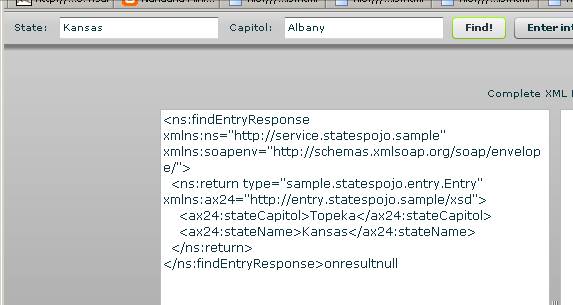
Looking for capitol of
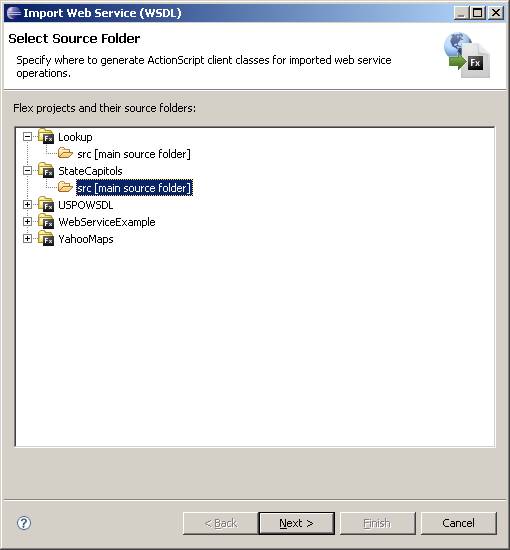
In Flexbuilder Select dataà import webservicesàselect src folder and click next
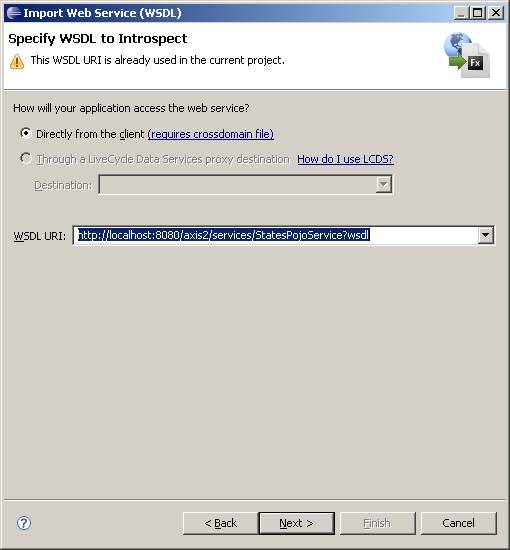
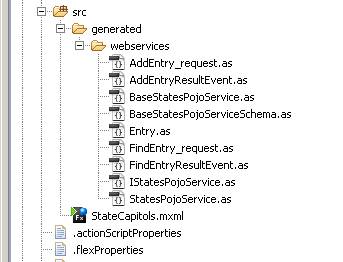
àenter URI for your axis2 webservice and select directly from client. XXX.as (ActionScript) classes for mapping to the service are generated. Here’s a shot of the as classes generated:
In this example, there are only two functions, the “addEntry” and “findEntry” and one class (Entry) to be mapped. Notice that Events have been generated for callback after the results are returned from the webservice.
A note… if you change your service class you must shut down and restart the server for the changes to take effect.
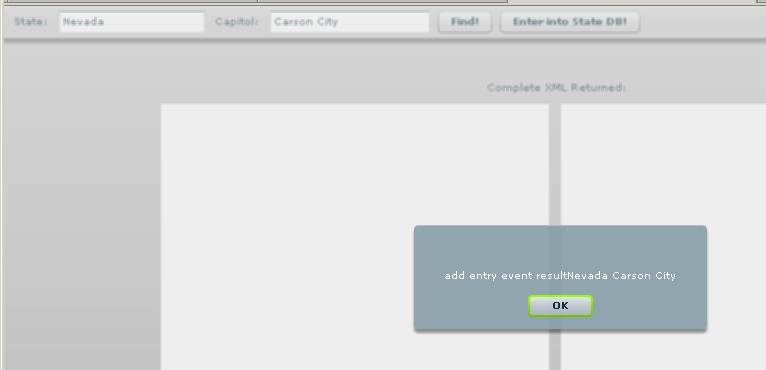
Alert showing
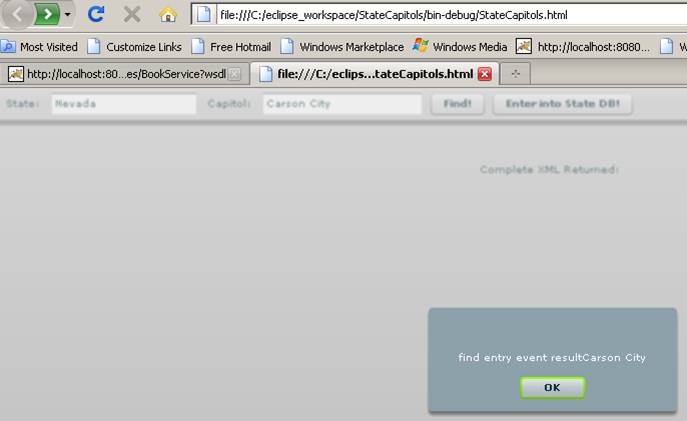
Then alert showing result of looking for
Notice then how I import the service class (and other generated classes). The service class is used to call the functions. The Entry. java maps to an Entry.as class. Event listeners for results are generated and these are added to the service class. The service class is used to call webservices functions when the buttons are pressed. The listeners route to functions to handle the callback.
<?xml
version="1.0" encoding="utf-8"?>
<mx:Application
xmlns:mx="http://www.adobe.com/2006/mxml"
backgroundColor="#cccccc"
layout="vertical"
paddingBottom="10"
paddingLeft="10"
paddingRight="10"
paddingTop="10"
creationComplete="init()">
<!--viewSourceURL="srcview/index.html"-->
<mx:Style>
Application {
backgroundColor: #cccccc;
backgroundGradientColors: #cccccc, #999999;
themeColor: #99ff00;
}
</mx:Style>
<mx:Script>
<![CDATA[
import mx.controls.Alert;
import mx.collections.ArrayCollection;
import mx.rpc.events.FaultEvent;
import mx.rpc.AsyncToken;
import mx.rpc.events.ResultEvent;
import mx.rpc.Responder;
import
generated.webservices.StatesPojoService;
import generated.webservices.*;
private var
sps:StatesPojoService;
[Bindable]
private var searching :
Boolean = false;
[Bindable]
private var sname:String="{stateName.text}";
[Bindable]
private var cname:String="{stateCapitol.text}";
private function init():void
{
sps=new StatesPojoService();
sps.addaddEntryEventListener(addEntryResult);
sps.addStatesPojoServiceFaultEventListener(onFault);
sps.addfindEntryEventListener(findEntryResult);
}
private function findEntryResult(event:FindEntryResultEvent):void
{
Alert.show("find
entry event result"+ event.result.stateCapitol);
//result is an
Entry object which has a String field called
stateCapitol, like the java class did.
}
private function
addEntryResult(event:AddEntryResultEvent):void
{ Alert.show("add
entry event result"+event.result.stateName+" "+event.result.stateCapitol);
//result is an Entry
object
}
private function addEntry():void
{
var entry:Entry=new Entry();
entry.stateName=stateName.text;
entry.stateCapitol=stateCapitol.text;//build
an entry object
sps.addEntry(entry);//use
StatesPojoService to call/map to ws function
}
private function findEntry():void
{var s:String;
s=stateName.text;
sps.findEntry(s);// use
StatesPojoService to call/map to ws function
}
private function onFault( event
: FaultEvent ) : void
{
//searching =
false;
Alert.show(event.fault.message.toString());
}
]]>
</mx:Script>
<mx:ApplicationControlBar
dock="true"
verticalAlign="middle">
<mx:Label
text="State:"/>
<mx:TextInput
maxChars="30"
id="stateName"
text="
<mx:Label
text="Capitol:"/>
<mx:TextInput
maxChars="30"
id="stateCapitol"
text="
<mx:Button
label="Find!"
click="findEntry()"
useHandCursor="true"
buttonMode="true" />
<mx:Button
label="Enter into
State DB!"
click="addEntry()"
useHandCursor="true"
buttonMode="true" />
</mx:ApplicationControlBar>
</mx:Application>
Building a database webservice
I took one of our CRUD servlets, changed it into an application, modified the ant build, and creates a mapping class Student. You need to put the mysql connector jar file into axis2 lib directory.
The Student class has getters and setters for its fields.
Here’s my service class:
package sample.studentsDBpojo.service;
import java.util.*;
import sample.studentsDBpojo.student.*;
import java.io.*;
import java.sql.*;
public class StudentsDBPojoService {
private Connection con;
public StudentsDBPojoService() {
}//constructor
public Student deleteStudent(String name){return new Student();}
public Student addStudent(Student x){
try {
// Load (and therefore register) the Oracle Driver
Class.forName("org.gjt.mm.mysql.Driver");
con = DriverManager.getConnection("jdbc:mysql://localhost/test", "DMH", "DMH");
System.out.println("got connection");
Statement stmt = con.createStatement();
String query="Insert into students (Name,Age,GPA, Year,Sex) values ";
query+="('"+x.getName()+"',"+x.getAge()+","+x.getGpa()+",'"+x.getYear()+"','"+x.getSex()+"')";
System.out.println("query="+query);
stmt.executeUpdate(query);
con.commit();
}
catch (Exception e) {
System.out.println("sql exception");
try { con.rollback();
}
catch (Exception ignored) { }
}
finally {
try { if (con != null) con=null;
}
catch (Exception ignored) { System.out.println("sql exception ignored"); }
}//finally
System.out.println("insert was successful! ");
return x;}
public Student updateStudent(String name){return new Student();}
public Student[] listStudents(){
Student[] students=new Student[20];
try {Class.forName("org.gjt.mm.mysql.Driver");
con = DriverManager.getConnection("jdbc:mysql://localhost/test", "DMH", "DMH");
ResultSet result=null;
Statement stmt = con.createStatement();
System.out.println("in list ...got con");
if (stmt.execute("SELECT * FROM Students")) {
result = stmt.getResultSet();
int k=0;
while(result.next()&&k<students.length) {
Student s=new Student();
s.setName(result.getString("Name"));
s.setId(result.getInt("Id"));
s.setYear(result.getString("Year"));
s.setGpa(result.getDouble("GPA"));
s.setSex(result.getString("Sex"));
s.setAge(result.getInt("Age"));
students[k]=s;k++;
}//while
}//if
}//try
catch(Exception e){System.out.println("sql or con error in list");
}//caTCH
finally {
try {
if (con != null) con=null;
}
catch (Exception ignored) { System.out.println("sql exception ignored"); }
}//finally
return students;
}//method
}//class
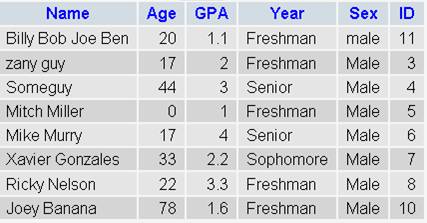
I modified the client file to just add a student: Here’s the black screen output, and the table afterwards:
C:\axis2-1.3\samples\studentsDBpojo>ant rpc.client
Buildfile: build.xml
clean:
[delete] Deleting directory C:\axis2-1.3\samples\studentsDBpojo\build
prepare:
[mkdir] Created dir: C:\axis2-1.3\samples\studentsDBpojo\build
[mkdir] Created dir: C:\axis2-1.3\samples\studentsDBpojo\build\classes
…more…..
rpc.client.run:
[java] log4j:WARN No appenders could be found for logger (org.apache.axis2.
util.Loader).
[java] log4j:WARN Please initialize the log4j system properly.
[java] Adding....Name :Billy Bob Joe Ben
BUILD SUCCESSFUL
Total time: 5 seconds
C:\axis2-1.3\samples\studentsDBpojo>
This is a good post that deals with the use of axis2 webservices to send back a List: http://www.devdaily.com/blog/post/java/java-web-service-client-read-array-list
Flex UI displays table contents. Here is call to add student and list function shows new student.
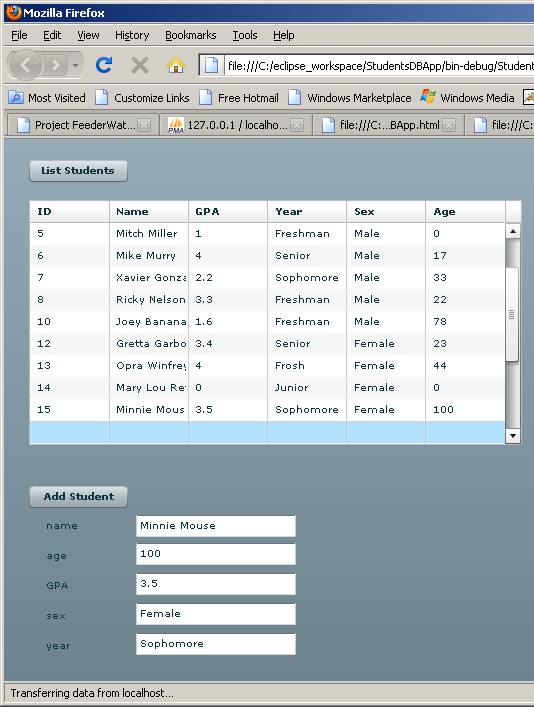
Some of the flex mxml:
[Bindable]
var
StudentArray:Array=new Array();
private function init():void
{
sps=new
StudentsDBPojoService();
sps.addaddStudentEventListener(addStudentResult);
sps.addStudentsDBPojoServiceFaultEventListener(onFault);
sps.addlistStudentsEventListener(listStudentsResult);
list();
}
private function
listStudentsResult(event:ListStudentsResultEvent):void
{
StudentArray=event.result
as Array ;}
private function newStudent():void
{
var
student:Student=new Student();
if(studentName.text.length>0&&studentAge.text.length>0&&studentYear.text.length>0&&studentGpa.text.length>0)
{student.name=studentName.text;
student.age=(int)(studentAge.text);////must
cast as int!!!!!
//var age:int=student.age;
student.year=studentYear.text;
student.sex=studentSex.text;
student.gpa=(Number)(studentGpa.text);
// Alert.show("about to
add"+student.name);
sps.addStudent(student);
}
else Alert.show("must
enter data in all fields");
}
private function onFault( event
: FaultEvent ) : void
{
//searching =
false;
Alert.show(event.fault.message.toString());
}
The array has been set as the datagrid dataprovider. This can be done in the design window..see right side of screenshot:
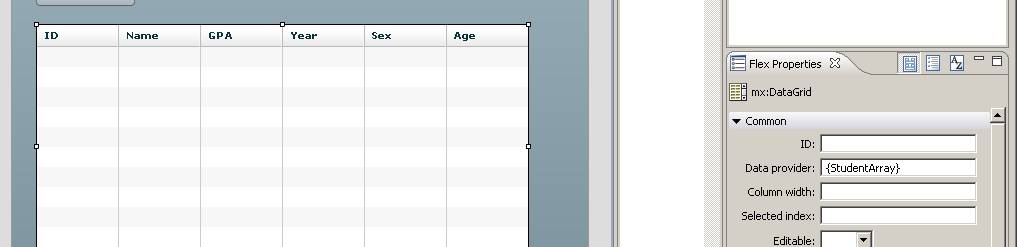
Adding student issues. The generated Student.as class mapped flex type Number to both java int and java double. Only the latter is correct. I had to fix this class by hand-editing the types. Here is my corrected Student.as:
package generated.webservices
{
import mx.utils.ObjectProxy;
import
flash.utils.ByteArray;
import
mx.rpc.soap.types.*;
/**
*
Wrapper class for a operation required type
*/
public class Student
{
/**
* Constructor,
initializes the type class
*/
public function Student() {}
public var age:int;
public var gpa:Number;
public var id:int;
public var name:String;
public var sex:String;
public var year:String;
}
}
Listing student issues: I tried every combination of List,
ArrayList and Collection but could not successfully return these datatypes to Flex. It is because
of weak-data-typing for these types. I
saw some postings where people claimed to have done this but I couldn’t manage.
I returned a (strongly-typed) array, Student[].