This document describes a spring-hibernate homework
and a spring MVC-JDBC project.
Due dates hw 1 week (due Oct 28th), project
2 weeks (due Nov. 4th )
Your homework. Spring can be used as a framework or piecemeal. It is pretty easy to make a “cobbed-together” spring-hibernate webapp. Here is one I built from the Events_with_Spring (html) examples in a few minutes. (These can be downloaded also, see the link in the html.) My servlet has code from the main class. It builds session factory, gets connection, opens Event table. HibernateUtils generates System.out.println output. I made no changes to any of the files in the examples except in terms of putting together a minimal servlet to get the HibernateUtils to generate the results of a “select *….” query.
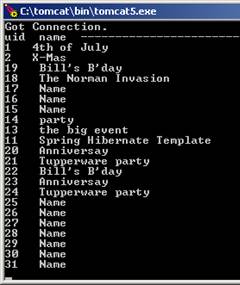
My Dir structure
this_web-app
WEB-INF
web.xml
src: the source code
lib (jar files): cp30,commons-collections, commons-logging, commons-pool, jta, log4j, slf-api-1.55, dom4j, javassist, hibernate3, spring, mysqlconnector, commons-dbcp
classes: DaoServlet, AbstractSpringDao,EventSpringDao, HibernateFactory, HibernateUtil, Event, DaoException and DataAccessLayerException, config files
project of course requires mapping & config files (Event.hbm.xml, hibernate.cfg.xml, context.xml)
The servlet has code from one of the main program examples from Events_with_Spring.html
Your HW: Do the same, but provide a user interface with list, ADD AND DELETE functionality using the DaoImp. (In this example it was called EventSpringDao.)
Your next project. Build an MVC/JDBC web app with CRUD functionality in Spring. You are welcome to use either of the quickstart step-by-step tutorials as a basis for your project, but you are not required to! I built the project at http://static.springsource.org/docs/Spring-MVC-step-by-step/part6.html but you could also use http://maestric.com/doc/java/spring/hello_world which is almost the same. (See screen shots) You’ll need to add jsp, controllers, and mappings for the additional functions (edit, delete). (I added insert and list was already there.) I indicate below where files were for me but depending which tutorial you follow, and what ant build script you use, yours may not be the same.
Here are lib files:
aspectjweaver-1.5.2a.jar
commons-collections-3.1.jar
commons-dbcp-1.2.2.jar
commons-logging.jar
commons-pool-1.5.2.jar
jstl.jar
mysql-connector-java-5.0.8-bin.jar
spring-webmvc.jar
spring.jar
standard.jar

My app
Other dirs… not used?
jsp
WEB-INF
src
springapp
repository…contains 2 XYZDao.java files
web… contains all the XYZControllers
domain… contains the model/POJO/table map classes.. for me just Product
service…Validators, Manager classes, AddProduct (etc…form classes)
lib
classes
packages& class files
message.properties
jdbc.properties
tld – dir for tag libs
build.xml
springapp-servlet.xml
build.properties
applicationContext.xml
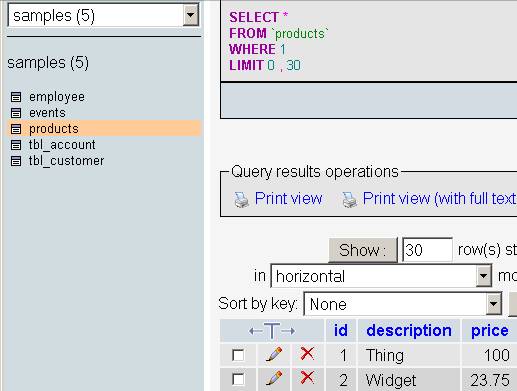
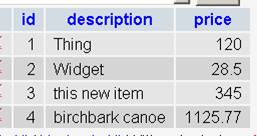
Here is original project. Make a mysql table…
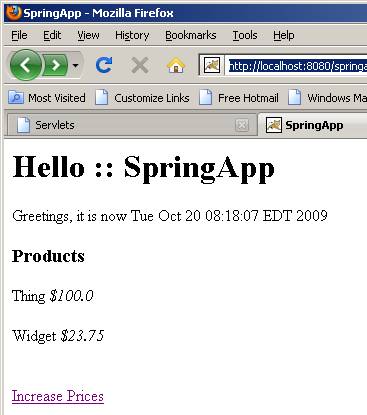
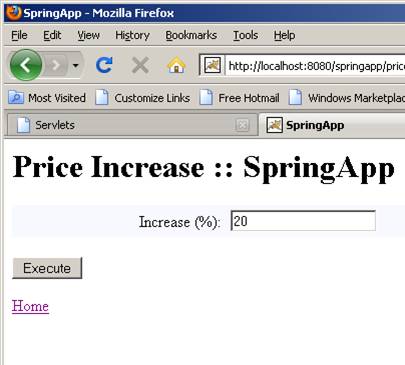
Here is revised project… note new link on ‘home’ page.

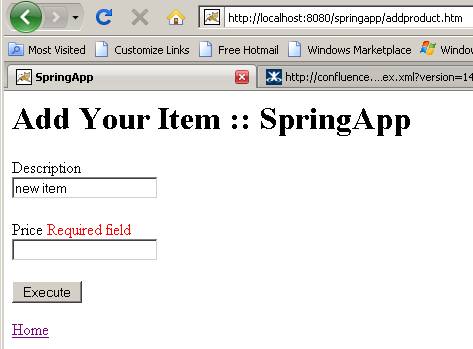
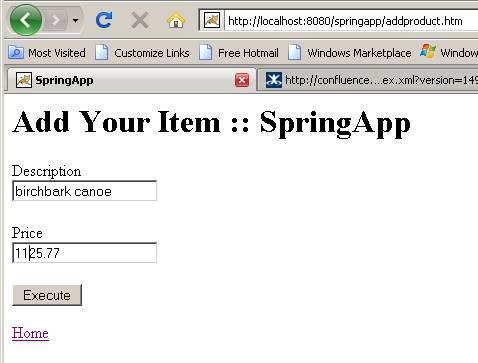
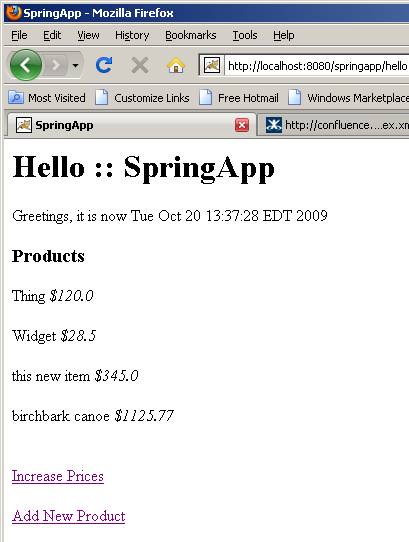
Current table:
You’ll have to make very minor changes in a few files. Mainly, you need to follow my template to add:
a jsp form
(addproduct.jsp)
<%@ include
file="include.jsp" %>
<%@ taglib
prefix="form"
uri="http://www.springframework.org/tags/form" %>
<html>
<head>
<title><fmt:message
key="title"/></title>
<style>
.error { color: red; }
</style>
</head>
<body>
<h1><fmt:message key="addproduct.heading"/></h1>
<form:form method="post"
commandName="addProduct">
Description
<form:errors path="description"
cssClass="error"/><br />
<form:input path="description"/><br /><br
/>
Price
<form:errors path="price"
cssClass="error"/><br />
<form:input path="price"/><br /><br />
<input
type="submit" value="Execute">
</form:form>
<a
href="<c:url
value="hello.htm"/>">Home</a>
</body>
</html>
A form controller
(AddProductController)
package springapp.web;
//omitted imports
public class AddProductFormController extends
SimpleFormController {
private
ProductManager productManager;
@Override
protected Object
formBackingObject(HttpServletRequest request) throws Exception {
Product
defaultProd = new Product();
defaultProd.setDescription("new item");
defaultProd.setPrice(new Double(100));
return defaultProd;
}
@Override
public
ModelAndView onSubmit(Object command) throws ServletException {
// ProductManager
productManager = new productManager();
productManager.addProduct((Product)command);
return new ModelAndView(new RedirectView(getSuccessView()));
}
public void
setProductManager(ProductManager productManager) {
this.productManager = productManager;
}
public
ProductManager getProductManager() {
return
productManager;
}
}
A validator (ProductValidator)… I omitted imports
below…
public class ProductValidator implements
Validator {
/** Logger for this class and subclasses */
protected final
Log logger = LogFactory.getLog(getClass());
public boolean
supports(Class clazz) {
return
Product.class.equals(clazz);
}
public void
validate(Object obj, Errors errors) {
Product prod
= (Product) obj;
ValidationUtils.rejectIfEmptyOrWhitespace(errors,
"description", "field.required", "Required
field");
ValidationUtils.rejectIfEmptyOrWhitespace(errors,
"price", "field.required", "Required field");
if ( ! errors.hasFieldErrors("price")) {
if (prod.getPrice().intValue() == 0)
errors.rejectValue("price", "not_zero",
"Can't be free!");
}//if
}//fn
}
A form handler class
(AddProduct)
package springapp.service;
import org.apache.commons.logging.Log;
import org.apache.commons.logging.LogFactory;
public class AddProduct {
/** Logger for this class and subclasses */
protected final
Log logger = LogFactory.getLog(getClass());
private double
price;
private String description;
public void
setPrice(double price) {
this.price=price;
logger.info("price
set to " + price);
}
public String
getDescription() {
return description;
}
public void
setDescription(String description) {
this.description=description;
logger.info("Description
set to " + description);
}
public double
getPrice() {
return price;
}
}
Additions needed to
be made to your springapp-servlet.xml file:
<bean name="/addproduct.htm"
class="springapp.web.AddProductFormController">
<property
name="sessionForm" value="true"/>
<property
name="commandName" value="addProduct"/>
<property
name="commandClass" value="springapp.domain.Product"/>
<property
name="validator">
<bean
class="springapp.service.ProductValidator"/>
</property>
<property
name="formView" value="addproduct"/>
<property
name="successView" value="hello.htm"/>
<property
name="productManager" ref="productManager"/>
</bean>
You’ll have to go
into the Dao interface and your Impl class to add methods for insert, update (edit) and delete. Here’s my insertProduct:
public void insertProduct(Product prod) {
logger.info("Inserting
product: " + prod.getDescription());
int count =
getSimpleJdbcTemplate().update(
"insert
into products (id, description, price) values (:id, :description,
:price)",
new
MapSqlParameterSource().addValue("description",
prod.getDescription())
.addValue("price",
prod.getPrice())
.addValue("id",
prod.getId()));
logger.info("Rows
affected: " + count);
System.out.println("in
insertProduct in DAO ");
}