What You See is What you Get (WYSIWYG)
A WYSIWYG user interface allows the person using the computer to see a very precise vision of what the final product will look like on the screen of the computer.
Before this technology became available, the screen showed only a standard typeface with no adjustments to spacing. The user would have to enter code tags to define whether the type was bold, regular, or italic; or if it was indent, flush right, etc. The code tags were visible on the screen. There were different coding languages used depending on the program. Only people who had strong skills and experience in setting type and laying out pages could trust their knowledge to envision the visual results their specifications would result in, and make accurate predictions.
Graphic designers immediately saw the potential of being able to design more quickly and accurately using the WYSIWYG display. They were able to see the formatting of the type as they set it. It allowed them to use their "design eye" to make adjustments as they worked. The designs printed as they appeared on the screen.
The WYSIWYG technology the 1984 Mac used was developed ten years earlier by Xerox for a document creation program called Bravo. However the computers that used this interface were too expensive for most graphic designers to use. The 1984 Mac cost $2,495.00, so many were able to purchase it.
Great, intuitive designs are those that allow us directly, and correctly,
to see what we can do with a thing.
Victor Kaptelinin, Interactive Design Foundation
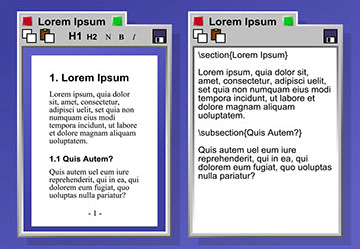
The image on the left show text edited using a WYSIWYG interface.
On the right, text that used code tags.
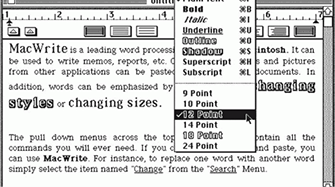
The type editor allowed the designer to choose point size and style, apply those attribute, and view it immediately.