CSCI 345 course notes
Course themes – running a server, deploying webapps to the server, automating the build process via Ant and Maven. The Hibernate db connection to make the webapp portable and the connection uniform. Java persistence. Spring simplifies the persistence aspect.
Most of the topics covered can be googled and you can find good websites and tips about how to do things.
- Environments and Servers: You may wish to use NetBeans or Eclipse
although to create the code for this class you could use any text
editor. Be sure to download the
java-webapps-version of Eclipse if you choose to go this route. If you use Netbeans, you might download
the version which is bundled with a Glassfish server. Both environments provide smart editors
which can format text, fix classpaths, suggest fields/methods for classes
and suggest code fixes. Both have
Ant/Maven plugins and can be configured to run with Tomcat.
- Starting out. Tomcat
- Install Tomcat.
- Start your server and test tomcat by going to http://localhost:8080
- Notes on tomcat admin go here
- You could instead use a standalone Glassfish server or JBoss. JBoss has an embedded Tomcat server, and Glassfish is also very similar to Tomcat. I will try to post some notes on those here. Tomcat will need an upgrade to run EJBs but JBoss can run them without modification.
- Tomcat admin and some other tomcat notes
- XML links-
a course supplement
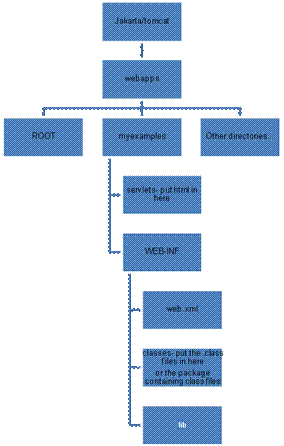
- If you don’t drop your servlets into
C:\TomcatHome\webapps\Root then you must build the correct directory
structure.
- In the
webapps directory of jakarta/tomcat you can create a directory
for your work, let’s say you call it MyStuff
- Create 2 directories, servlets and web-inf under MyStuff.
- In servlets, you will put all your html files.
- In web-inf
you will place web.xml (your servlet information file) and a directory
called classes, where you’ll place the package directory containing
servlet.class files. lib would
also go here.
- wars, ears and jars. Jar is a zip format that java can create (with the jar command). Jar stands for “java archive”. You also specify the name you want for the resulting jar file, and what is to be jarred, and some other things. Ears and wars are jar files. war stands for “Web Archive”. Some servers require the ear extension. Tomcat will accept entire directory structures (moved into webapp) or a war file (containing everything).
Assuming the java jdk is in the classpath, to create a war file you would type
jar cvf MyAppName.war list_of_files_and/or_dirs_goes_here
An example batch file to set classpaths for compiling in the current directory: Assuming you are in the home directory of a webapp, in Windows, use set classpath= list; of; dirs;… to adjust path settings for a given webapp.
set
CLASSPATH=.;C:\ejb_jar_files\ejb.jar;C:\ejb_jar_files\jndi.jar;C:\ejb_jar_files\geronimo-ejb.jar;C:\ejb_jar_files\persistence.jar;C:\ejb_jar_files\j2ee.jar;C:\ejb3example2\src;
Other directories like jdk/bin might need to be listed, depending on environment settings.
- Building a servlet web app
from CoreServlets text
- Deploying a jsp web app: no servlet, just server pages.
- More jsp examples. JSP powerpoint link These are several examples from CoreServlets text. Deploy to tomcat.
- Servlet links for the course. (Notes from Hunter and Hall)
- MySQL is an open source database server.. Requirements: You will need to download and install a mysql server from. http://www.mysql.com/ You already have one if you have an Xampp, Wamp or InstantRails distribution. These are nice because you can configure your mysql db with phpmyadmin running on apache. Link to PHPMyAdmin notes here. You will need a connector for java. http://dev.mysql.com/downloads/connector/j/5.1.html With mysql installed, you can build a database and access it from a webapp. Of course, both the MYSQL server and webapp will need to be running! Typical functionality is called CRUD (for create-read-update-delete) to manage table records in a database.
- A servlet that queries a mysql database. Link to servlet here.
12. More ant… deploying a web app The following are in a single long html which explores the maven archetype for generating a pom and project directory structure, culminating with an appfuse installation
13.
Building a webapp with Maven . Maven is a software project management and comprehension tool. Based on the concept of a project object model (POM), Maven can manage a project's build, reporting and documentation from a central piece of information. Linked at maven . This includes an in-depth description of what Maven is, a list of some of its main features, and a set of frequently asked questions about what Maven is. Maven, a Yiddish word meaning accumulator of knowledge, was originally started as an attempt to simplify the build processes in the Jakarta Turbine project. There were several projects each with their own Ant build files that were all slightly different and JARs were checked into CVS. We wanted a standard way to build the projects, a clear definition of what the project consisted of, an easy way to publish project information and a way to share JARs across several projects.
Getting started links at http://maven.apache.org/guides/index.html
14. Building a multimodule webapp with
Maven
Multimodule webapp with java and flex built with Maven Look at this flex-maven html
To do: Now go back
to the php/flex/mysql from CS311 and redo this with servlets and maven
There is also the
higgindm/sweng/java and flex.ppt
To do: Now go back
to the php/flex/mysql from CS311 and redo this with servlets and maven
There is also the higgindm/sweng/java and
flex.ppt
16.
- Spring MVC
- JSF
- Struts: An MVC framework for JSP
- sending mail from a webapp